In 2026, choosing between Selenium and Playwright isn’t just a tooling preference – it directly impacts CI/CD stability, execution speed, and maintenance overhead.
The industry trend is clear:
- Playwright is becoming the default for modern automation
- Selenium remains deeply embedded in enterprise and legacy ecosystems
This guide cuts through the noise and focuses on what actually matters: architecture, performance, developer experience, and real-world trade-offs.
Architecture First: Why Playwright Feels “Faster”
Everything else – speed, flakiness, DX – comes from this.
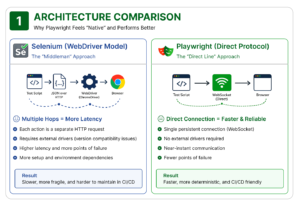
🔵 Selenium: The WebDriver Model (Indirect Execution)
- Test → JSON → WebDriver → Browser
- Requires separate drivers (e.g., Chromed river)
- Each action = separate HTTP request
👉 Result:
- latency
- Driver version mismatches
- More points of failure in CI
🔵 Playwright: Direct Browser Control
- Communicates via browser-native protocols (e.g., DevTools)
- Single persistent connection (WebSocket)
- No external drivers required
👉 Result:
- Near-instant execution
- Deterministic behavior
- Fewer environment issues
Performance & Reliability: Where the Real Gap Shows
If your pipeline suffers from flaky tests, this is the deciding factor.
Speed & Parallelism
- Playwright: 2–3x faster (persistent connection + lightweight contexts)
- Selenium: Slower due to repeated request/response cycles
Flakiness (The Real Cost)
-
Selenium
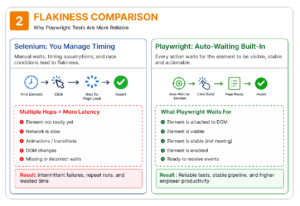
- Often requires manual “wait” statements. If the network is slow, the test fails because the element wasn’t there yet.
-
Playwright
- Auto-waiting built into every action
- It automatically checks if an element is visible, enabled, and stable before it attempts to click.
- This one feature alone can eliminate up to 80% of common test flakiness.
Real Code Comparison (Side-by-Side)
Let’s compare how the same step looks:
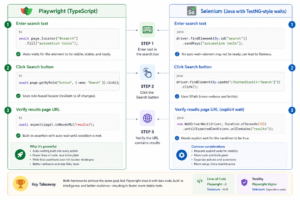
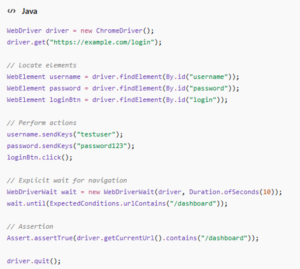
Let’s understand with simple example of Logging into an application and verifying a successful redirect to the dashboard
🟢 Selenium (Java + WebDriver)
🟢 Playwright (Type Script)
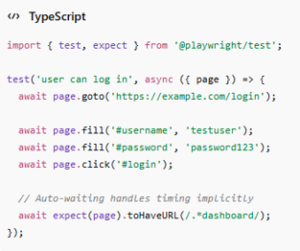
💡 Key takeaway
This isn’t just a syntax difference – it reflects two fundamentally different design philosophies:
- Selenium gives you control, but requires you to manage complexity
- Playwright removes that burden by design, trading control for determinism
In small tests, the difference looks minor but at scale (hundreds or thousands of tests), it becomes the difference between:
- a stable pipeline
- and constant firefighting
Developer Experience: Less Glue Code, More Testing
Playwright Advantages
- Unified API across Chromium, Firefox, WebKit
- Built-in tooling:
- Trace Viewer (time-travel debugging)
- (record → generate code)
- Network mocking (no proxy needed)
Selenium Reality
- Requires custom helpers for:
- waits
- windows/tabs
- synchronization logic
👉 Result:
- More boilerplate
- More maintenance overhead
Language and framework fit
Both tools are multi‑language, but their ecosystems differ:
| Aspect |
Selenium |
Playwright |
| Core languages |
Java, Python, C#, Ruby, JS, Kotlin, more pantheon+1 |
JS/TypeScript, Python, C#, Java frugaltesting+1 |
| Modern web focus |
General‑purpose, legacy‑friendly pantheon+1 |
Strong for React, Angular, Vue, SPAs frugaltesting+1 |
| Ecosystem maturity |
Huge plugins, mature integrations pantheon+1 |
Growing fast, modern DX, strong JS/TS angle frugaltesting+1 |
Stack Alignment: Choose Based on Your Ecosystem
Use Selenium if:
- You’re deeply invested in Java + TestNG/JUnit
- You have large, stable legacy suites
- Migration cost is prohibitive
Use Playwright if:
- Your stack is JavaScript/TypeScript or Python
- You’re building modern frontend apps
- You care about DX and fast feedback loops
Browser Coverage & Real-World Constraints
Where Selenium Still Wins
- Legacy browser support (e.g., IE11)
- Enterprise compliance environments
- Mature ecosystem (plugins, grids, cloud vendors)
Where Playwright Dominates
- Modern browsers (Chromium, Firefox, WebKit)
- Mobile emulation and responsive testing
- SPA-heavy apps (React, Angular, Vue)
Decision Framework: When to Choose What
Choosing between these two isn’t about which tool is “better”- it’s about which one fits your current technical debt and future goals.
🟢 Choose Playwright (Default for New Projects)
If you are starting fresh, Playwright is almost always the right answer. It is built for the “Modern Web” (React, Vue or Angular) and solves the #1 complaint of automation engineers: flaky tests.
You should adopt Playwright if:
- Speed is a KPI: You need 2-3x faster execution to keep up with rapid CI/CD deployments.
- Developer Experience (DX) Matters: You want a tool with built-in “Auto-waiting,” meaningful error logs, and powerful debugging tools like the Trace Viewer.
- Your Stack is JS/TS or Python: It pairs natively with modern frontend environments, reducing the “context switching” for your developers.
- You’re Testing Complex Workflows: You need to mock APIs, handle multiple browser contexts (like testing “User A” and “User B” simultaneously), or capture video of failed runs.
🟡 Stick with Selenium (Pragmatic Choice)
Selenium isn’t going anywhere, and in specific enterprise environments, it remains the “gold standard.”
You should stay with Selenium if:
- Legacy is Non-Negotiable: Your application must support Internet Explorer 11 or very specific older browser versions for compliance.
- The “Cost of Change” is Too High: You have thousands of stable, mature tests in a Java/TestNG framework that would take years to migrate.
- Infrastructure is Locked-In: Your Company is deeply invested in Selenium Grid or specific third-party enterprise clouds that are optimized for WebDriver.
💡 Pro-Tip: The Hybrid Strategy
Many top-tier engineering teams no longer choose just one. They use Playwright for all new feature development and modern flows, while keeping Selenium on “maintenance mode” for legacy modules. This gives you the speed of the future without the risk of a massive rewrite.
Migration Strategy (Low-Risk Approach)
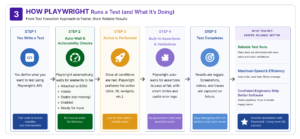
Migrating an entire test suite can feel overwhelming. The key is not a “Big Bang” rewrite, but a strategic, low-risk transition. Here is how to move your team from Selenium to Playwright without breaking your delivery pipeline.
Step 1: The “Proof of Concept” (POC)
Don’t start with your hardest test. Pick a small, stable, and high-value module – like a Login flow or a Search page. Rewrite just this one piece in Playwright to get a feel for the API.
Step 2: The Side-by-Side Benchmark
Run your new Playwright tests alongside your existing Selenium ones. This is your “data gathering” phase. Compare:
Execution Time: Is Playwright actually 3x faster in your environment?
Maintenance: How many times did the Selenium version “flake out” compared to Playwright?
Step 3: The “New Features First” Policy
Instead of rewriting old code, mandate that all new test automation be written in Playwright. This stops your Selenium debt from growing and naturally builds your team’s Playwright expertise.
Step 4: The Long-Term Decision
After 30 days, review the data. You can then decide to:
Full Migration: Slowly sunset Selenium.
Final Takeaway: Strategy Over Hype for Selenium vs Playwright
In 2026, the data is clear: Playwright is the modern standard. It delivers the speed, stability, and developer experience that modern web apps demand.
However, being a great automation engineer means being a pragmatic engineer.
- Choose Playwright to accelerate your CI/CD and eliminate the “flaky test” headache.
- Respect Selenium for the massive browser coverage and enterprise stability it provides for legacy systems.
👉 The real question is:
Do you need to move faster and reduce flakiness, or maintain stability in a legacy ecosystem?
Bottom Line
- Choose Playwright to accelerate delivery and reduce test instability
- Keep Selenium where legacy support and existing investment matter
Don’t switch because it’s new.
Switch because your system demands it.






 explore more