Digital Process Automation (DPA) addresses exactly this kind of operational drag. Unlike point solutions that tackle one task at a time, DPA orchestrates entire workflows — spanning people, systems, and data — from the moment a process begins until it's complete and documented.
This guide covers what DPA actually is (and isn't), how it compares to BPM and RPA, which features matter most, real industry use cases, and how to choose between an off-the-shelf platform and a custom-built solution.
Key Takeaways
- DPA automates and orchestrates end-to-end business workflows — not just isolated tasks
- It evolved from Business Process Management (BPM) and is broader in scope than Robotic Process Automation (RPA)
- Key benefits include lower operational costs, faster cycle times, fewer errors, better compliance, and a stronger customer experience
- Industries like logistics, healthcare, fintech, and manufacturing see strong ROI from DPA
- Custom-built DPA solutions outperform off-the-shelf platforms for complex or regulated workflows
What Is Digital Process Automation (DPA)?
DPA is the use of low-code platforms, workflow engines, AI, and integration layers to automate entire business processes from start to finish. The goal is end-to-end orchestration — not automating a single step, but coordinating every step: routing work items, triggering approvals, connecting systems, enforcing business rules, and producing an audit trail throughout.
From BPM to DPA
The term DPA has a clear origin point. In 2017, Forrester formally replaced "Business Process Management" with "Digital Process Automation" as the defining category label, noting that BPM's primary goal was shifting from cost reduction toward digital transformation.
Forrester's DPA Wave that same year described the category as emphasizing low-code development, AI-based innovation, and consumer-grade UX. BPM was historically associated with long, expensive modeling projects aimed at process perfection. DPA kept the rigor but traded lengthy implementation cycles for faster deployment and a sharper focus on customer experience outcomes.
What a "Digital Process" Actually Looks Like
In a digitized process:
- Work items are structured and tracked from creation to completion
- Routing happens automatically based on defined business rules
- Exceptions surface immediately rather than disappearing into email threads
- Every action is logged, timestamped, and auditable
The contrast with manual alternatives is stark: a purchase approval buried in someone's inbox, a patient form faxed between departments, or an invoice hand-keyed into three separate systems.
What DPA Is NOT
- Not a bot that mimics mouse clicks — that's RPA (covered below)
- Not a replacement for human judgment — DPA structures and routes work; people still make complex decisions
- Not a project management tool — DPA governs operational processes, not project timelines or task lists
- Not AI alone — AI enhances DPA (intelligent document processing, decision routing, exception handling), but the foundation is workflow orchestration
DPA vs. BPM vs. RPA: Understanding the Differences
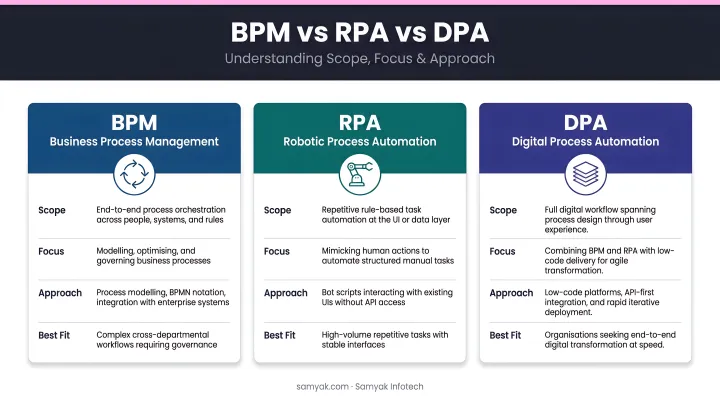
These three acronyms get conflated constantly. Here's how they actually differ:
| BPM | RPA | DPA | |
|---|---|---|---|
| Focus | Model and optimise processes | Automate repetitive UI tasks | Orchestrate end-to-end workflows |
| Approach | Process design and analysis | Bot scripts mimicking human actions | Low-code platforms + integrations + AI |
| Scope | Process improvement methodology | Task-level automation | Multi-step, cross-system process automation |
| Best for | Complex process design projects | High-volume, rule-based repetitive tasks | Digitising and continuously improving business processes |
RPA vs. DPA in Practice
Gartner defines RPA as software that automates tasks using scripts that emulate human interaction with application user interfaces. RPA is excellent at what it does (copying data between systems, scraping web pages, processing structured files) — but it operates at the task level, not the process level.
DPA addresses what happens around those tasks: routing, approvals, exceptions, notifications, escalations, and the integration layer connecting every system involved.
A simple way to decide which approach fits your situation:
- Use RPA for high-volume, repetitive task automation where no process redesign is needed
- Use DPA when the goal is to digitise, orchestrate, and continuously improve a complex, multi-step process across departments or systems
- Treat RPA as a component within a DPA strategy — not a replacement for one
Key Benefits of DPA Software
Operational Efficiency and Cost Reduction
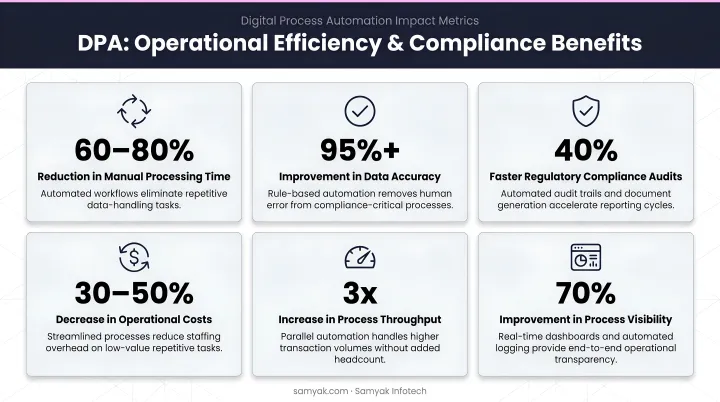
Automating manual handoffs, approval chains, and data entry cuts cycle times significantly. According to Deloitte's 2022 intelligent automation survey, organizations that moved beyond pilots achieved an average 32% cost reduction through intelligent automation programs. McKinsey similarly found that successful operations centers can reduce costs by 30% to 60% while improving delivery quality.
Those aren't outliers. Samyak Infotech's hyperautomation implementation for a shipping and logistics client saved over 200 manual work hours per day, generating quarterly cost savings exceeding $250,000.
Improved Accuracy and Compliance
Manual data entry is a consistent source of errors. DPA eliminates it by:
- Capturing data once at the source and propagating it automatically
- Enforcing business rules at every step — no exceptions based on who's handling the case
- Generating tamper-proof audit trails automatically
- Enforcing compliance with frameworks like GDPR, HIPAA, and 21 CFR Part 11
For regulated industries, this last point is critical. Samyak's pharmaceutical workflow automation delivered 100% compliance in regulatory reporting while reducing manual reporting time by 60%.
Better Customer Experience and Workforce Empowerment
Faster internal processes mean faster service delivery. When a loan application gets processed in minutes instead of days, or a patient form routes automatically instead of sitting in a fax queue, customers notice.
Employees benefit too. DPA removes repetitive, low-value work — data re-entry, status updates, chasing approvals — freeing teams to focus on judgment-intensive or relationship-driven tasks. Teams can scale output without adding headcount.
Data-Driven Decision-Making
Paper-based and email-driven workflows are invisible. DPA makes them measurable. Every digitized process generates structured data that leaders can act on:
- Cycle times and throughput rates
- Approval rates and rejection patterns
- Bottleneck frequency and location
- SLA compliance across teams
Spreadsheets and email chains can't produce this visibility. DPA gives operations leaders a continuous feedback loop to identify what's slowing processes down — and fix it.
Core Features to Look For in DPA Software
Workflow Automation and Process Modeling
Look for visual, drag-and-drop workflow designers — typically BPMN-based — that business and IT users can work with together. The platform should handle:
- Task assignment and routing
- Automated notifications and escalations
- Conditional branching and business rules
- Long-running, multi-step workflows that span days or weeks
The Object Management Group's BPMN standard provides the graphical notation that underlies most enterprise-grade workflow designers. It's worth confirming any platform you evaluate supports it.
Integration and API Connectivity
A DPA platform that can't connect to your existing systems isn't much use. Priorities:
- Pre-built connectors for common enterprise systems (ERP, CRM, HRMS)
- REST/SOAP API support for custom integrations
- EDI support for logistics and supply chain contexts
- Minimal custom coding required for standard integrations
Samyak Infotech's automation implementations routinely connect Power Automate with SAP ERP, CRM systems, e-commerce platforms, and third-party APIs — making integration depth a non-negotiable criterion when evaluating platforms.
Low-Code Development and Forms
Low-code and no-code capabilities matter because process requirements change constantly. A platform that requires developer involvement every time a form field changes or an approval step is added creates bottlenecks. Look for:
- Drag-and-drop form builders
- Configurable workflow logic without scripting
- Business user-accessible configuration
- Rapid iteration and deployment cycles
Gartner notes that enterprise low-code platforms accelerate development using model-driven tools, generative AI, and pre-built component catalogs — adoption has risen sharply, with Deloitte reporting low-code implementation for intelligent automation nearly doubled from 24% to 40% between 2020 and 2022.
Case Management, Analytics, and Security
Three capabilities round out a complete DPA feature set:
- Case management handles non-linear processes — insurance claims, loan approvals, patient onboarding — where every case follows a different path. Knowledge workers need to manage exceptions intelligently, not force every situation into a rigid approval workflow.
- Real-time analytics should surface process KPIs, bottleneck reports, and SLA tracking through accessible dashboards. Samyak Infotech's FlowBuilder platform, for instance, includes a centralized dashboard providing visibility across all active workflows.
- Security requirements include role-based access controls, data encryption, audit logs, and cloud-native scalability that handles growing process volumes without performance degradation.
DPA Use Cases Across Industries
Industry-Specific Examples
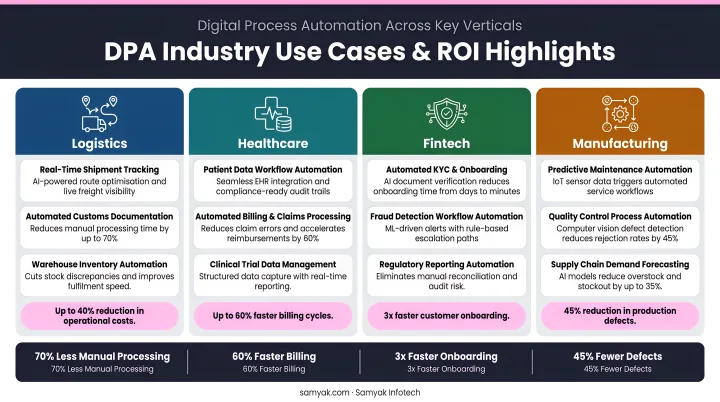
Logistics/Supply Chain: Shipment exception management is a high-friction process in most logistics operations. Automating exception detection, routing, and customer notification eliminates the manual calls and emails that slow resolution. DCSA reports that full adoption of electronic bills of lading could unlock $6.5 billion in direct cost savings and between $30–40 billion in annual global trade growth. That figure reflects how much value remains trapped in paper-based freight document workflows.
Healthcare: CAQH's 2024 Index found that healthcare automation avoids $222 billion annually, with fully electronic prior authorization workflows saving $515 million per year and 14 minutes per authorization. Patient onboarding and prior auth are among the highest-ROI automation targets in the sector.
Fintech/Banking: McKinsey documented a digital credit workflow that processed approximately 40% of loan applications automatically end-to-end, reducing "time to yes" from 24–48 hours to 4 minutes for fully automated applications. Samyak has replicated similar outcomes in loan processing engagements, reducing approval time by 50% and processing errors by 40%.
Manufacturing/Pharmaceuticals: Samyak's pharmaceutical workflow automation replaced paper forms, emails, and phone calls across 100+ users spanning PMO, Purchase, PPIC, and other departments. The project delivered improved margins, 100% compliance in regulatory reporting, and significant reductions in SAP license costs.
Cross-Functional Use Cases
These processes cut across industries:
- Employee onboarding and offboarding
- IT service requests and change management
- Contract review and approval
- Procurement and vendor onboarding
- Invoice processing and accounts payable
- Regulatory compliance reporting
The common thread: structured, trackable digital processes replace fragmented email-and-spreadsheet workflows. Choosing the right DPA platform determines how quickly those gains take hold.
How to Choose and Implement DPA Software
Selection Framework
- Identify high-impact processes first — prioritize processes with high volume, high error rates, compliance requirements, or significant manual effort
- Evaluate platforms on integration depth, low-code flexibility, AI capabilities, and scalability — not just feature checklists
- Assess vendor viability — implementation support, product roadmap, and domain expertise in your industry
- Decide: off-the-shelf or custom-built
This last decision deserves careful thought. Off-the-shelf DPA platforms like Microsoft Power Automate work well for standard processes with common integration requirements.
For businesses in specialized sectors (logistics, healthcare, manufacturing, pharmaceuticals) with non-standard workflows, complex compliance requirements, or deep ERP dependencies, a custom-built DPA solution often delivers better long-term fit.
Samyak Infotech starts with a detailed consultation to map existing infrastructure and operational objectives, then recommends either a platform implementation, a custom solution, or a hybrid combining pre-built components with custom layers.
With 25+ years of enterprise software development across logistics, healthcare, manufacturing, and fintech — including work for Fortune 100 companies — the team brings sector-specific depth to automation projects where generic platforms fall short.
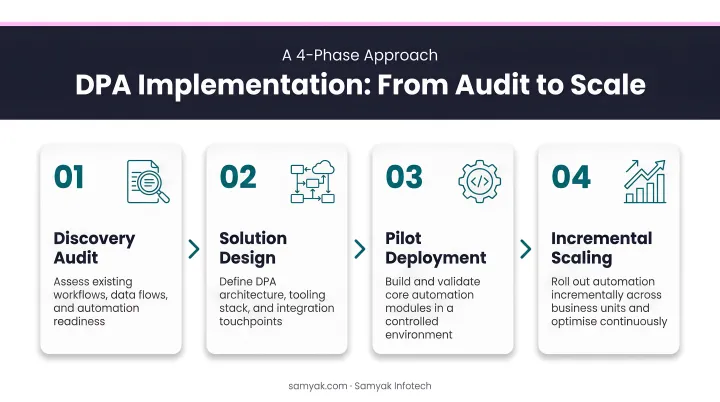
Phased Implementation Approach
Trying to automate everything at once is a reliable way to fail. A structured rollout looks like this:
- Process audit — document current workflows, identify bottlenecks, and quantify the cost of manual steps
- Set measurable goals — "reduce invoice approval time by 40%" is a goal; "improve efficiency" is not
- Pilot one high-value process — validate the platform and the approach before scaling
- Scale incrementally — apply lessons from the pilot to additional use cases
Change Management Is Not Optional
A 2023 Forrester DPA survey found that while 75% of organisations expect business users to engage in process optimisation, 57% lack a clear strategy for making that happen, and only 8% require employees to train in automation tools. That gap explains a large share of DPA implementation failures.
In other words, most organisations are investing in the technology while under-investing in the people using it. Technical execution is necessary — but sustaining automation at scale also requires:
- Involve end users in design, not just deployment
- Communicate clearly how automation changes — not eliminates — their roles
- Build internal governance and ownership, whether through a formal Center of Excellence or a designated process automation team
- Plan for continuous improvement, not a one-time launch
Frequently Asked Questions
What is digital process automation?
DPA is the use of digital technology — including low-code platforms, workflow engines, and AI — to automate and orchestrate end-to-end business processes. It improves efficiency, accuracy, and customer experience by replacing manual handoffs and email-driven workflows with structured, trackable digital processes.
What is the difference between DPA and RPA?
RPA automates specific repetitive tasks by mimicking human actions in existing user interfaces — think data entry or screen scraping. DPA orchestrates entire end-to-end workflows across systems, people, and decision points. RPA handles individual tasks; DPA manages the full process those tasks belong to.
What are the key features of digital process automation software?
Core features typically include:
- Visual workflow modeling (BPMN-based) and low-code process builders
- Pre-built system integrations and API connectivity
- Case management for non-linear processes
- Business rules engine for conditional logic
- Real-time analytics and dashboards
- Role-based access controls and audit trails
What industries benefit most from digital process automation?
Logistics, healthcare, financial services, manufacturing, and pharmaceuticals see the strongest ROI from DPA. These sectors combine high process complexity, strict compliance requirements, and large volumes of repetitive manual work — exactly the conditions where DPA delivers the most measurable value.
How long does it take to implement a DPA solution?
A pilot automation of a single high-value process can go live in weeks with a low-code platform. Enterprise-wide rollouts typically take several months, depending on integration complexity, process volume, and change management requirements — with custom-built solutions taking longer but delivering a better fit for specialized workflows.
Closing Thoughts
Since most of the friction comes from coordination rather than a lack of automation, the real fix is giving teams one place to design, connect, and run their workflows end to end, instead of stitching together point tools. Check out FlowBuilder if you're looking for a practical way to get started on that.