According to NetSuite, a 1% picking error rate can cost roughly $130,000 per year at 1,000 orders per day—and $1.3 million per year at 10,000 orders per day. That's the stakes when warehouse execution tools don't match operational complexity.
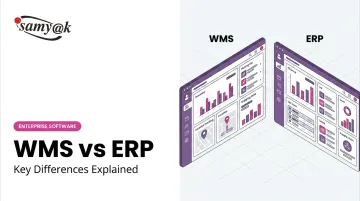
This article breaks down what WMS and ERP each do, where they differ, and how to decide which investment makes sense for your business right now.
TL;DR
- WMS is purpose-built for warehouse execution—receiving, picking, packing, and shipping—tracked in real time at the bin level.
- ERP connects your entire business: finance, sales, purchasing, inventory, HR, and more under one system.
- ERP gives broad company-wide visibility; WMS gives deep, granular warehouse control.
- Most businesses start with ERP and add WMS as warehouse complexity grows.
- High-volume operations typically benefit most from running both systems in integration.
WMS vs ERP: Quick Comparison
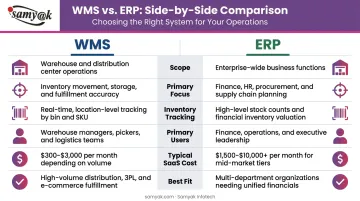
Use this side-by-side breakdown to quickly see where WMS and ERP overlap — and where they diverge.
| Dimension | WMS | ERP |
|---|---|---|
| Scope | Warehouse floor operations only | Finance, sales, HR, inventory, and more |
| Primary Focus | Execution speed and inventory accuracy | Planning, visibility, financial management |
| Inventory Tracking | Bin, lot, serial number — real time | High-level totals and order status |
| Primary Users | Warehouse staff, pickers, ops managers | Finance, sales, procurement, leadership |
| Typical Cost (SaaS) | $100–$500/user/month; ~$500–$3,000/month for mid-market platforms | $150–$300+/user/month for mid-market (e.g., Microsoft Dynamics 365 Finance starts at $210/user/month) |
| Best Fit | High-volume operations needing fulfillment precision | Businesses needing cross-department coordination |
What Is a Warehouse Management System (WMS)?
A WMS is software designed to manage and track every physical movement of goods inside a warehouse—from the moment inventory arrives to the moment it ships out. The key distinction: WMS is an execution tool, not a planning tool.
Core WMS Capabilities
WMS platforms cover these functional areas:
- Receiving and put-away — directed workflows that place inventory in optimal locations
- Real-time inventory tracking — via barcode or RFID, down to the bin and shelf level
- Pick-and-pack optimization — wave, batch, and zone picking methods to reduce travel time
- Shipping integration — carrier connections, label generation, and manifests
- Cycle counting — continuous inventory audits without shutting down operations
- Labor management — tracking productivity by worker, zone, or task type
The Real-Time Advantage
Unlike an ERP, which updates inventory at the transaction level—when an order is placed or a shipment is received—a WMS tracks every movement continuously. Nucleus Research found that WMS implementations increased inventory accuracy by 20% on average. Best-in-class warehouses target 99.5% or higher accuracy; a dedicated WMS is typically what closes the gap.
Three WMS Deployment Models
| Type | Description | Trade-off |
|---|---|---|
| Standalone (on-premises) | High customization, full control | Higher upfront cost, IT overhead |
| Cloud/SaaS | Lower upfront cost, scalable | Less customization flexibility |
| ERP-integrated module | Embedded within ERP, unified data | Limited depth vs. dedicated WMS |
Use Cases Where WMS Is Critical
Standalone or advanced WMS platforms are most justified in:
- High-volume e-commerce fulfillment — where speed and accuracy drive customer satisfaction
- 3PL providers — managing inventory for multiple clients with distinct rules (the 3PL segment held the largest WMS market share in 2024)
- Pharmaceutical and cold-chain warehouses, where lot and serial tracking support regulatory compliance
- Multi-warehouse operations that require unified bin-level visibility across locations
Real deployments back this up. After implementing Manhattan Warehouse Management, Chinese apparel retailer Semir improved picking efficiency by 60%, cut labor costs by 40%, and improved space utilization by 30%.

What Is an Enterprise Resource Planning (ERP) System?
ERP is an integrated platform that connects core business processes across all departments — finance, sales, HR, procurement, and operations — so every team works from the same data. Unlike a WMS, which focuses exclusively on warehouse execution, ERP covers the full width of a business.
Core ERP Modules
Most ERP systems include:
- Financial management (A/R, A/P, general ledger)
- Order and sales management
- Purchase order management
- Inventory management (high-level)
- CRM and customer data
- Payroll and HR
- Reporting and analytics
The Cross-Department Benefit
ERP eliminates data silos. When a sales order is placed, it automatically triggers inventory allocation and purchasing workflows without manual handoffs between teams. SKYGEN, for example, cut its financial close cycle to just 10 days after implementing Oracle Cloud ERP, reflecting ERP's core strength: tying financial and operational processes together.
Where ERP Falls Short in the Warehouse
ERP systems include basic pick/pack/ship functionality, and for straightforward operations that's often enough. But they typically lack:
- Dynamic bin optimization
- Real-time labor tracking by task or zone
- Multi-method picking (wave, batch, zone)
- Granular lot and serial number tracking at movement level
This gap is exactly where a dedicated WMS earns its place.
Use Cases Where ERP Alone Works
ERP without a dedicated WMS is often the right call for:
- Small to mid-sized wholesalers or distributors with manageable SKU counts
- Businesses running a single warehouse with predictable order flow
- Companies that primarily need accounting, CRM, and inventory visibility in one place—without complex fulfillment execution needs
Once order volumes grow or warehouse complexity increases, that calculus shifts — and understanding what a WMS adds becomes the next critical question.
WMS vs ERP: Key Differences Explained
The core conceptual distinction is straightforward: ERP answers "What do we have and what does it cost across the business?" while WMS answers "Where is each item right now and how do we move it most efficiently?"
Both are valid questions. They just require different tools.
Scope vs. Depth
ERP is designed for breadth—managing multiple business functions simultaneously across departments. WMS is designed for depth—optimizing a single domain with far more granularity than an ERP can provide at the operational level.
An ERP might tell you that you have 500 units of SKU-A on hand. A WMS tells you that 200 are in Bay 4, Shelf 3, Bin 2; 150 are in the pick zone; and 150 are currently staged for outbound Shipment #8841.
Data Timing and Granularity
| Dimension | ERP | WMS |
|---|---|---|
| Update frequency | Transaction-level (order placed, shipment received) | Continuous, every physical movement |
| Location detail | Warehouse or zone level | Bin, shelf, serial number |
| Labor tracking | Not typically included | By worker, task, and zone |
| Picking methods | Basic | Wave, batch, zone, cluster |
Integration, Not Competition
WMS and ERP are not competing tools—they're complementary. When integrated, the workflow looks like this:
- ERP receives a customer order and sends it to the WMS
- WMS executes — directs picking, packing, and shipping with real-time accuracy
- WMS reports back to ERP, triggering invoicing and updating inventory totals
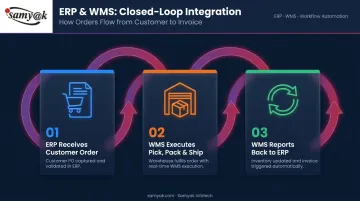
This closed loop gives businesses the best of both: financial and order management in the ERP, precise warehouse execution in the WMS.
How well that loop performs depends on how you connect the two systems. That choice comes down to two paths:
ERP-Native WMS vs. Third-Party WMS Integration
- ERP-native (embedded module): Eliminates integration complexity with real-time data consistency and lower maintenance overhead. Best when warehouse needs are moderate and unified data is the priority.
- Third-party WMS via API: Delivers more specialized warehouse functionality, but introduces data sync delays and higher ongoing maintenance. Best for high-volume or complex operations that need advanced capabilities beyond what an ERP module provides.
WMS, ERP, or Both? How to Choose
The right decision comes down to operational complexity and where your current pain points live—not company size alone.
Decision Framework
Choose ERP alone if:
- Order volumes are manageable and warehouse operations are straightforward
- You need accounting, purchasing, and inventory in one place
- A single warehouse with predictable SKU counts
Add WMS to your ERP when:
- Picking errors are frequent and costly
- Inventory accuracy falls below 95%
- SKU complexity or order volume has grown beyond ERP's built-in tools
- You're managing multiple warehouses or fulfillment locations
- Customers are complaining about fulfillment speed or accuracy
- You need barcode or RFID scanning at the bin level
Industry-Specific Guidance
- E-commerce and 3PL: Almost always require dedicated WMS. E-commerce is the fastest-growing WMS adoption sector, driven by real-time inventory demands and multi-channel fulfillment pressure.
- Manufacturing: Complex production logistics often justify both systems—ERP for production planning and financials, WMS for parts inventory and finished goods movement.
- Small distributors and wholesalers: Typically start with ERP and evaluate WMS once order volume or SKU complexity creates measurable fulfillment problems.
- Pharmaceutical and cold chain: WMS is often non-negotiable for lot and serial tracking required by regulatory frameworks.
When Off-the-Shelf Isn't Enough
Most standard operations are well-served by established ERP and WMS platforms. But some businesses have workflows that don't fit neatly into generic software—custom bin logic, industry-specific traceability rules, or deep integration with proprietary logistics systems.
For these edge cases, a custom-built solution typically outperforms adapting a platform that wasn't designed for the work. Samyak Infotech has spent over 20 years building tailored warehouse and enterprise systems for Fortune 100 companies across logistics, manufacturing, and pharmaceutical sectors.
The ROI Case for WMS
A dedicated WMS costs more than an ERP's built-in warehouse module—but the payback timeline can be short when execution costs are high. Nucleus Research found that an international industrial parts distributor achieved 204% ROI and a 6-month payback period after implementing Savant WMS, including $405,000 in annual headcount cost avoidance.
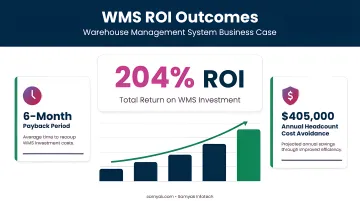
At high order volumes, the math on WMS investment becomes difficult to ignore.
Conclusion
WMS and ERP solve fundamentally different problems. ERP gives businesses company-wide visibility and financial control. WMS gives warehouse operations real-time precision and execution speed. The right choice depends on where your operational complexity lives — not on company size or industry label.
As supply chains grow more demanding and fulfillment expectations tighten, businesses running on the wrong system will struggle to keep pace with those that aren't. The starting point is straightforward: examine your current pain points.
These signals point clearly to which investment comes next:
- Frequent inventory errors → WMS to improve warehouse-level accuracy
- Slow or disconnected financials → ERP to unify cross-department visibility
- Slow fulfillment cycles → WMS for real-time execution and pick/pack efficiency
- Disconnected systems across departments → ERP integration to consolidate data flows
Frequently Asked Questions
What is WMS or ERP?
A WMS (Warehouse Management System) is purpose-built software for managing physical inventory movement inside a warehouse. An ERP (Enterprise Resource Planning) system is a company-wide platform that connects finance, sales, purchasing, and operations into one unified system.
What is the most popular WMS?
Widely recognized WMS platforms include Manhattan Associates, Blue Yonder, SAP Extended Warehouse Management, Oracle WMS, and Körber. The best fit depends on business size, industry vertical, and whether the WMS needs to integrate with an existing ERP.
Can an ERP replace a WMS?
ERP includes basic warehouse management features that work well for simple operations. For high-volume warehouses, it can't match a dedicated WMS in real-time tracking granularity, advanced picking methods (wave, batch, zone), or labor optimization.
Do small businesses need a WMS?
Most small businesses with straightforward inventory can rely on ERP alone. WMS becomes necessary when order volume, SKU count, and warehouse complexity grow beyond what an ERP's built-in tools can handle accurately.
When should a company add WMS to their ERP?
Signs it's time to add a WMS include frequent picking errors, inability to track inventory at bin level, high return rates from fulfillment mistakes, growing multi-warehouse operations, or customer complaints about order accuracy and speed.
What is the difference between a standalone WMS and an ERP-integrated WMS?
A standalone WMS is a separate system requiring API or middleware integration with ERP, which introduces synchronization complexity. An ERP-integrated (native) WMS is embedded within the ERP platform, offering real-time data consistency and lower maintenance overhead, though with less specialized warehouse functionality.