What is FlowBuilder workflow automation software?
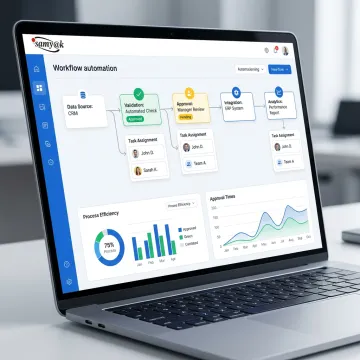
FlowBuilder workflow automation software is a configurable platform for organizing, automating, and monitoring business processes. Teams can build workflows, capture information through forms, assign work, track progress, and manage activities from a centralized dashboard. It is intended to reduce repetitive administrative effort while creating clearer ownership, more consistent execution, and stronger visibility across process stages.
What types of processes can FlowBuilder automate?
FlowBuilder can support workflows that involve requests, approvals, task assignment, document or data collection, status updates, and operational tracking. Common uses include finance approvals, manufacturing back-office processes, construction coordination, healthcare administration, and internal service requests. The workflow structure can be tailored to the steps, roles, rules, and information requirements of a specific business process.
Do users need technical skills to build workflows?
FlowBuilder includes a user-friendly workflow builder designed to help teams create and automate workflows without extensive technical skills. Users can configure process steps and create smart forms with customizable formatting and layouts. For more complex requirements, Samyak Infotech can provide custom software development and integration expertise to ensure the solution fits existing systems and business rules.
Can FlowBuilder integrate with existing business systems?
Yes. Samyak Infotech provides end-to-end software and hardware integration services covering data acquisition, processing, analysis, control, and automation. FlowBuilder can be planned alongside existing business applications so data does not remain isolated in separate tools. Integration requirements should be defined early, including required data sources, user roles, security controls, and expected workflow outcomes.
How does a centralized workflow dashboard help teams?
A centralized dashboard gives managers and teams one place to monitor workflow progress, track active work, and identify items needing attention. Instead of relying on disconnected emails, spreadsheets, or verbal updates, users can view process status and operational information in context. This improves accountability, supports quicker decisions, and helps organizations recognize recurring delays or process bottlenecks.
Can FlowBuilder be customized for our industry?
Yes. FlowBuilder is supported by Samyak Infotech’s custom software development capability, allowing workflows to be aligned with industry-specific operations. The company serves sectors including logistics, healthcare, manufacturing, construction, fintech, retail, and professional services. Customization can address approval paths, forms, operational terminology, compliance reporting, integrations, and the data required for meaningful process oversight.
How is workflow data protected?
Workflow data protection should be designed around access controls, secure integrations, data-handling requirements, and the sensitivity of the processes being automated. Samyak Infotech holds ISO/IEC 27001:2022 certification for information security management and ISO 9001:2015 certification. During planning, the team can assess security expectations and incorporate appropriate controls into the software solution and integration approach.
What should we prepare before implementing FlowBuilder?
Begin by identifying the process you want to improve, the people involved, the information collected, and the outcomes that matter. Document current steps, common delays, approvals, exceptions, and connected systems. This creates a useful foundation for workflow design. Samyak Infotech can then help translate those operational requirements into configurable forms, automation rules, dashboards, and tailored software functionality.