Introduction
Salesforce research covering 7,775 sales professionals found that reps spend just 28% of their week actually selling — with the rest consumed by planning, admin, and travel. For field sales teams, the travel problem is especially painful. Reps crisscross territories, miss high-value accounts, and spend hours manually building routes that software can generate in minutes.
Sales route planning software is purpose-built to fix this. It goes well beyond basic GPS navigation to organize, prioritize, and optimize multi-stop field visits — factoring in CRM data, appointment windows, real-time traffic, and account priority to put reps in front of the right accounts at the right time.
This guide walks through how to evaluate and choose the right route planning software, what features actually matter for field teams, and when a custom-built solution outperforms anything available off the shelf.
Key Takeaways
- Sales route planning software optimizes multi-stop visits using CRM data, account priority, and live traffic — not just shortest distance
- Key benefits: more daily visits, reduced drive time, stronger territory coverage, and more hours spent actually selling
- Must-have features include multi-stop optimization, real-time re-routing, CRM integration, mobile access, territory management, and visit analytics
- Off-the-shelf tools suit standard use cases; complex operations with unique routing logic often need a custom-built solution
- Measure ROI by tracking visit volume, drive time, fuel costs, and pipeline growth before and after implementation
Why Every Field Sales Team Needs Sales Route Planning Software
Without optimized routing, reps default to habit — visiting the same familiar accounts, building routes manually the night before, and backtracking across territories because no one mapped the most logical sequence. Multiply that inefficiency across a team of 10 or 20 reps and the lost selling time becomes significant.
The Cost of Manual Routing
The numbers from real-world deployments are telling:
- Anchor Packaging cut route planning time from 3 hours to 1.5 hours weekly after switching to route optimization software
- The Lake Company was losing 2 hours per day to territory planning and reporting — reduced to 5 minutes with software
- NCR Aloha reps saved 8 hours per week in drive time and cut total drive time by 25%
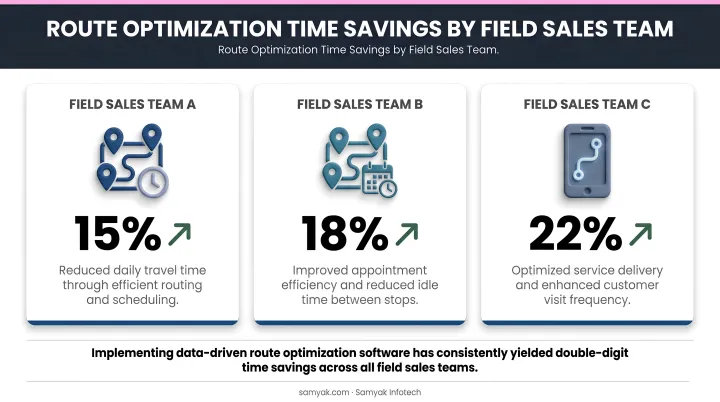
These aren't outliers. Manual planning creates backtracking, schedule gaps, and no visibility into which accounts are being neglected.
More Visits, More Pipeline
An optimized day looks nothing like a manually planned one. Instead of a rep zigzagging across a territory, software sequences stops geographically and by priority, fitting more visits into the same hours.
NCR Aloha reps reached 10 meetings per day, 50 per week after implementing route optimization. Cutter & Buck saw weekly meetings per rep climb from 12 to 20. These gains compound: one additional visit per day across a five-rep team is 25 more selling opportunities every week.
Territory Coverage and Revenue Impact
Route planning software also addresses a less visible problem: blind spots. Without systematic coverage tracking, territories develop dead zones where high-value prospects go unvisited for months.
According to Sales Management Association research, effective territory optimization can increase sales and profits by 4% to 12% and reduce travel costs by 10% to 15%. Territory management software alone can contribute 1% to 3% more revenue. Managers also gain clear visibility into rep activity across regions — making coaching conversations far more productive.
Must-Have Features in Sales Route Planning Software
Not all tools are built equally. Before evaluating vendors, know which capabilities are non-negotiable for field sales specifically.
Multi-Stop Route Optimization
This is the core function — and it's nothing like Google Maps. Google Maps optimises the path between two points. Sales route planning software sequences dozens to hundreds of stops, weighing appointment windows, visit durations, and account priority simultaneously.
The best platforms let reps lock key appointments in place and optimise remaining stops around them. That flexibility matters when a top-tier client has a fixed 9am window and everything else needs to flow around it.
CRM Integration
A tool without deep CRM integration is just a mapping app. The software should pull live account data — visit history, deal stage, last contact date — to inform route decisions. After each visit, activity logs should push back to the CRM automatically, eliminating manual data entry.
Look for bi-directional, real-time sync with platforms like Salesforce and HubSpot. A one-way contact import is a workaround, not true integration.
Real-Time Traffic and Dynamic Re-Routing
A route built the night before is already outdated by 8am. Traffic, cancellations, and added stops change throughout the day. The software should adapt mid-day, recalculating the remaining sequence when conditions change.
Territory Management
Beyond daily routing, the software should let managers visualise, create, and balance territories on a map. This means rep workload balancing, account assignment, and the ability to spot underserved regions before they become revenue gaps.
Mobile-First Access and Offline Capability
Reps work in the field, not at desks. The mobile app must be fast, intuitive, and functional without a stable data connection. Offline capability is non-negotiable for reps in rural areas or buildings with poor signal.
Nucleus Research found that mobile CRM access drives a 14.6% productivity increase — the field experience is where adoption is won or lost.
Reporting and Manager Visibility
Sales leaders need dashboards showing visit completion rates, drive time per rep, time per stop, and how field activity connects to pipeline outcomes. Without this data, coaching stays guesswork and proving ROI to leadership becomes an uphill argument.
How to Choose the Right Sales Route Planning Software
Start With Your Actual Pain Points
List the problems costing your team the most:
- Too much time spent on daily planning
- Poor CRM adoption because logging is manual and slow
- Unbalanced territories with coverage blind spots
- No manager visibility into what reps are actually doing
Match the tool's strengths to your biggest problems. Avoid buying a feature-rich enterprise platform to solve a problem a simpler tool handles well.
Evaluate Integration Depth, Not Just Compatibility
A vendor claiming "CRM integration" on a features page can mean anything from a full bi-directional sync to a one-time contact import. During demos, ask to see the integration workflow live — specifically:
- Does account data update in real time, or on a sync schedule?
- Do visit logs push back to the CRM automatically after check-in?
- Can route decisions be filtered by CRM fields like deal stage or account tier?
If the vendor can't show you this in a live demo, treat it as a red flag.
Match the Tool to Your Business Model
Tools built for high-volume door-to-door canvassing work very differently from those designed for B2B wholesale distribution or pharmaceutical field sales. Consider what your reps actually do in the field:
| Use Case | What to Prioritize |
|---|---|
| Enterprise B2B field sales (Salesforce users) | Salesforce Maps — native integration, territory management |
| SMB or individual outside reps | Badger Maps — mobile-first, simple routing |
| Mobile-first field CRM | Map My Customers — built-in CRM, route + pipeline |
| Pharmaceutical / life sciences | Veeva Vault CRM — HCP call planning, compliance |
| High-volume door-to-door | SalesRabbit or SPOTIO — canvassing and smart routing |
Assess Total Cost of Ownership
Subscription price is rarely the whole cost. Factor in:
- Implementation and data migration time
- Onboarding and training overhead
- Integration development costs for non-native connections
- Ongoing admin burden
A lower monthly price with a six-month implementation can cost more than a pricier tool you're using effectively in week two. One practical approach: pilot the software on your hardest territory first. If it handles that, it will handle the rest.
How to Build and Optimise Sales Routes: A Step-by-Step Process
How to Build and Optimize Sales Routes: A Step-by-Step Process
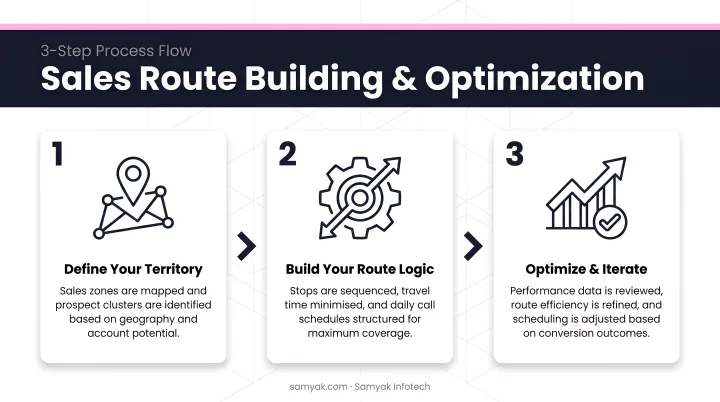
Follow these three steps to move from scattered account data to a repeatable, high-performance field sales process.
Map accounts and prioritize by value. Import customer and prospect data, then filter by account priority, deal stage, or required visit frequency. Overlaying this on a territory map immediately reveals coverage gaps and clustering opportunities.
Sequence stops around highest-impact opportunities. Let the software minimize drive time, but configure it to weight account priority over pure geographic proximity when those two factors conflict. Lock key appointments first, then optimize everything around them.
Build in buffer time and capture post-visit notes. Every route needs breathing room for overruns. After each stop, reps should log visit notes immediately via voice memo, one-tap check-in, or quick form. Consistent logging transforms route data into CRM intelligence that makes future routes smarter.
Off-the-Shelf vs. Custom Sales Route Planning Software
When Off-the-Shelf Is the Right Call
Standard field sales teams with common CRM setups, straightforward territories, and predictable workflows can typically extract full value from an established SaaS platform. Key advantages include:
- Deploys in under 30 days with minimal configuration
- Well-documented onboarding reduces ramp-up time
- Pre-built integrations cover mainstream CRMs out of the box
When Custom Becomes the Better Investment
Some operations simply can't be made to fit a standard tool without expensive workarounds. Custom development makes sense when:
- Routing logic is non-standard — multi-depot operations, industry-specific compliance constraints, or complex prioritization rules that off-the-shelf tools can't configure
- Integration with proprietary systems is required — connecting to a legacy ERP, internal order management system, or proprietary CRM that no standard plugin supports
- The business is scaling into new territories or business lines — where the platform needs to grow with unique operational requirements, not constrain them
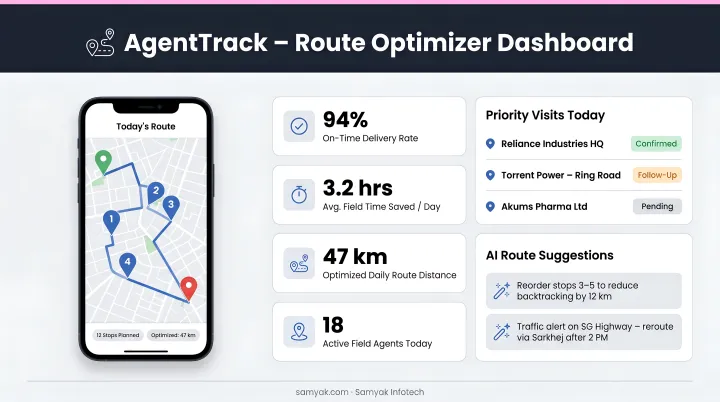
Samyak Infotech's AgentTrack and Route Optimizer platforms were built precisely for these scenarios — handling real-time GPS tracking, dynamic re-routing, sales force automation software and ERP/CRM integration, multi-stop optimization, and field agent mobile access across logistics and field operations use cases. With over 20 years of logistics software development experience, Samyak Infotech builds around a client's actual workflows, data structures, and growth plans — configuring the solution to the business, not the reverse.
Three Questions to Guide the Decision
If two or more of these apply, a custom build deserves serious evaluation:
- Does your operation have non-standard routing rules that can't be configured in standard tools?
- Do reps need the app to connect with proprietary back-end systems?
- Is the business scaling rapidly into new territories, verticals, or business models?
Frequently Asked Questions
What is the best route planning software for field sales?
The right tool depends on team size, industry, CRM stack, and workflow complexity. Salesforce Maps suits enterprise teams on Salesforce; Badger Maps works well for individual reps and SMBs; Map My Customers is strong for mobile-first field CRM. Teams with highly specific routing requirements may be better served by a custom-built solution.
What is a real example of route optimization?
A pharmaceutical rep with 12 client visits plans a manual zigzag route. With route optimisation software, the same stops are reordered by geographic cluster and appointment window — cutting 45 minutes of drive time and freeing up a slot for one additional visit that day.
How is sales route planning software different from GPS navigation apps?
GPS apps find the fastest path between two points. Sales route planning software optimises the sequence of multiple stops based on account priority, visit history, CRM data, and appointment windows — turning a list of addresses into a strategic daily selling plan.
How does sales route planning software integrate with CRM systems?
Most platforms offer native or API-based integrations that pull account and contact data to build routes, then push visit logs, call notes, and activity records back to the CRM automatically. This eliminates manual data entry and keeps records current without extra effort from reps.
Can small businesses benefit from sales route planning software?
Yes — even a single rep with 8–10 daily stops benefits from optimised sequencing. Several tools offer individual-tier pricing, and the time and fuel savings typically cover the cost within the first few weeks.
How do I measure the ROI of sales route planning software?
Track these metrics before and after implementation: daily visit volume per rep, average drive time, fuel and mileage costs, selling hours per week, and pipeline growth.